
Microsoft Xbox Series S: A Compact Console for Digital Gaming
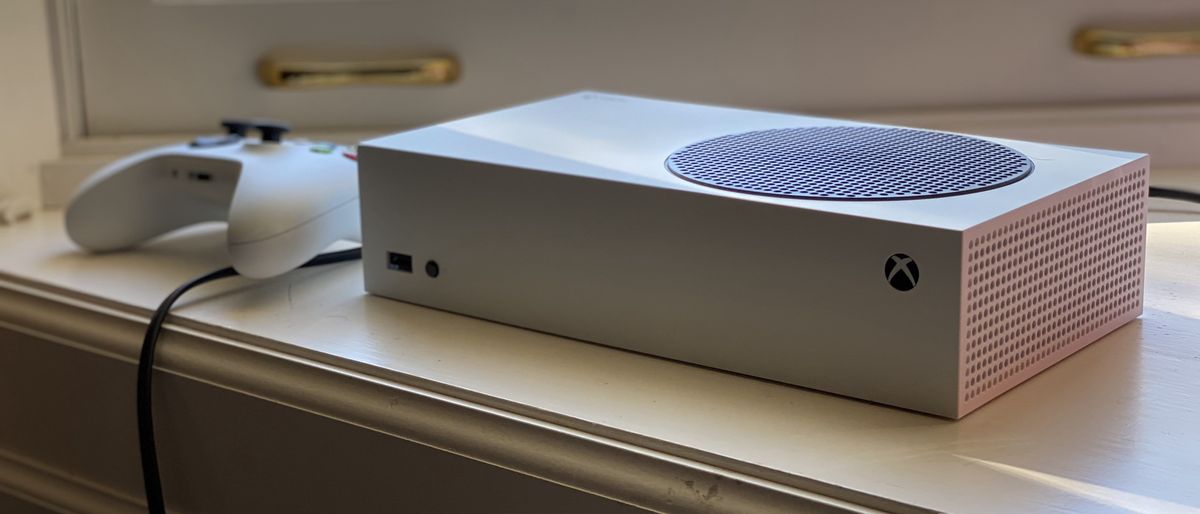
Microsoft Xbox Series S: A Compact Console for Digital Gaming
The Microsoft Xbox Series S is a small, all-digital console designed for players who want access to current-generation Xbox games without choosing the larger, more powerful Xbox Series X. Its compact size, quick load times, and broad game library make it an appealing option for smaller spaces and digital-first households.
Compact Design, Digital-Only Games
One of the Xbox Series S’s most distinctive features is its size. The console is considerably smaller than the Xbox Series X and can fit easily on a desk, shelf, or entertainment center. It has no disc drive, so games must be downloaded or streamed rather than played from physical discs. That also means Xbox One, Xbox 360, and original Xbox discs cannot be used with the Series S.
Xbox Series S models are available with different storage capacities, including 512GB and 1TB versions, depending on the model and market. Because the operating system uses some of the built-in storage, the space available for games is less than the advertised capacity. Players with large libraries may want to consider additional storage.
Performance and Visuals
The Series S is built to play games from the Xbox Series X|S generation, with features such as fast loading, Quick Resume for switching between supported games, and performance modes that can reach up to 120 frames per second in select titles. Many games target resolutions below the Xbox Series X’s typical 4K presentation, often aiming for 1440p or lower. Actual resolution and frame rate depend on the game and its graphics settings.
While the Series S shares the same generation of Xbox hardware and supports many of the same games as the Series X, it has less processing and graphics power. Some games may use lower-resolution visuals or reduced detail to run on the smaller console. It is best suited to players who value affordability and convenience over the highest available resolution.
Games, Backward Compatibility, and Game Pass
The Xbox Series S supports a wide range of digital Xbox games, including many titles originally released for earlier Xbox consoles. Compatible older games may benefit from faster loading or improved performance, though enhancements vary by title.
Players can buy games digitally through the Xbox Store or access games through subscription services such as Xbox Game Pass, subject to the current plan and catalog. A subscription is optional; games can also be purchased individually. Since the Series S has no disc drive, physical game collections and used discs are not an option on this console.
Storage Options
Storage can be an important consideration, especially for players who install several large games. Compatible expansion cards can add storage for current-generation games. USB external drives can store and play many backward-compatible titles, but games designed specifically for Xbox Series X|S generally need to be played from the console’s internal storage or a compatible expansion card.
Who Should Consider the Xbox Series S?
The Xbox Series S may suit players who:
- Prefer downloading games instead of buying discs
- Want a compact console for a bedroom, office, or smaller living space
- Are looking for a more affordable way to play many current Xbox games
- Want access to Xbox’s digital game library and optional subscription services
Players who own a large collection of physical Xbox games, want native 4K gaming, or prioritize the strongest graphics performance may prefer the Xbox Series X. The Series S is also less convenient for people with limited or slow internet access, since games must be downloaded and updates can require substantial data.
The Bottom Line
The Xbox Series S offers a compact, accessible way to play a broad selection of Xbox games. Its quick loading, digital library, and small footprint are major advantages, while its lack of a disc drive, limited storage, and lower performance compared with the Series X are important trade-offs. For digital-first players who do not need top-tier graphics, it can be a practical entry point into the Xbox Series X|S generation.
Maximize Your Xbox Series S Experience: 6 Essential Tips for Gamers
- Check your TV’s settings to enable 1440p or 120Hz if supported.
- Use Game Pass to explore a large library of games.
- Remember, Series S is digital-only and has no disc drive.
- Manage storage regularly; many modern games use lots of space.
- Use a Storage Expansion Card to play optimized games from added storage.
- Try backward-compatible games from supported Xbox generations.
Check your TV’s settings to enable 1440p or 120Hz if supported.
To get the best picture and smoothest gameplay from your Xbox Series S, check your TV’s settings and make sure 1440p resolution or a 120Hz refresh rate is enabled if your TV supports it. Then, on your console, open Settings > General > TV & display options to choose an available resolution and refresh rate. Support varies by TV, HDMI port, and game, so consult your TV’s manual and use a compatible HDMI connection for the best results.
Use Game Pass to explore a large library of games.
Use Xbox Game Pass to explore a large library of games on your Xbox Series S. Depending on your subscription plan and the current catalog, you can try different genres, discover new favorites, and play select games without buying each one separately. Since the Series S is digital-only, Game Pass can be a convenient way to make the most of its online game library.
Remember, Series S is digital-only and has no disc drive.
The Xbox Series S is a digital-only console, so it doesn’t have a disc drive. Games must be downloaded from the Xbox Store or accessed through available digital services, and physical game discs, Blu-ray movies, and DVDs can’t be played on the console. If you already own a collection of Xbox discs, consider that limitation before choosing the Series S.
Manage storage regularly; many modern games use lots of space.
Manage your Xbox Series S storage regularly, since many modern games take up a substantial amount of space. Check your installed games and apps, remove titles you no longer play, and move compatible games to external storage when needed. Keeping enough free space makes it easier to install new games and updates without scrambling to clear room at the last minute.
Use a Storage Expansion Card to play optimized games from added storage.
Add a Storage Expansion Card to your Xbox Series S to increase space for your game library and play optimized Xbox Series X|S titles directly from the added storage. Unlike a standard USB drive, a compatible expansion card is designed to deliver the performance these games require, so you can keep more favorites installed and switch between them without moving games back and forth. Before buying, check that the card is compatible with your console.
Try backward-compatible games from supported Xbox generations.
Explore backward-compatible games on your Xbox Series S to revisit favorites from supported Xbox generations. Many older digital titles can be downloaded from your library or purchased through the Microsoft Store, and some may benefit from faster loading or improved performance. Since the Series S has no disc drive, you’ll need a digital copy of each game. Check the game’s compatibility before purchasing, as support and enhancements vary by title.


Leave a Comment